Smart Lighting Control Systems — Buttons & Wall Panels
Smart lighting control systems on LoRaWAN (Long Range Wide Area Network) bring smart buttons, scene panels and relay switches together across a commercial site without chasing a single wall. Every unit runs on the AU915 band from Australian stock.
Primary CTA: </w:sdtPr><w:sdtContent><w:r w:rsidDel="00000000" w:rsidR="00000000" w:rsidRPr="00000000"><w:rPr><w:rFonts w:ascii="Arial Unicode MS" w:cs="Arial Unicode MS" w:eastAsia="Arial Unicode MS" w:hAnsi="Arial Unicode MS"/><w:rtl w:val="0"/></w:rPr><w:t xml:space="preserve">[ Shop Smart Controls & Switches → ] Secondary CTA: [ Request Trade Pricing ]
Category Intro
Qantec Automation is an authorised Australian distributor of Milesight building-automation hardware, and this range covers the smart button, scene panel, light controller and metered socket tier of any LoRaWAN deployment. These devices form the field-level input and switching layer of smart lighting control systems, bridging human triggers and automated scenes to luminaires, fans and appliances across the AU915 ISM band. Every model is held in Australian stock with local firmware support, AU915 pre-configuration and trade pricing for systems integrators and building management system (BMS) contractors.
Sub-Categories
Numbered tiles for WooCommerce rendering. Each tile auto-links to its live product page.
Featured Products
CTA Bar
Need a Smart Controls Rollout Quoted This Week?
Send through your fixture schedule and zone count, and our team will size the smart button, panel and relay switch mix against your AU915 coverage. Trade-registered integrators receive volume pricing and pre-joined device EUIs on request.
[ Request Trade Pricing ]
Detailed Content
On this page: Overview · Milesight Smart Button & Panel Range · Range at a Glance · Australian Compliance · Why Specify Qantec · Smart Button FAQ
Smart Lighting Control Systems Overview
A smart button is a battery-powered LoRaWAN end node that converts a physical press into an encrypted uplink, triggering a scene, actuator or alarm across a building network. The Milesight WS101 operates as a Class A device across eight regional frequency plans, including AU915-928, and supports short, long and double-press actions configured over NFC.
Across a commercial site, a smart button rarely works alone. Paired with the Smart Scene Panel range and the WS558 relay switch, the smart button becomes the trigger layer of full smart lighting control systems, where one press can switch a zone, recall a scene, or signal a duress event. A single wireless smart button can replace a bank of manual switches. The Milesight D2D (Device-to-Device) protocol lets a LoRaWAN button or panel command a relay switch directly, with sub-second latency and no gateway in the path — useful when lighting must respond instantly within a wider building automation platform [Link to: Building Automation Systems Pillar Page].
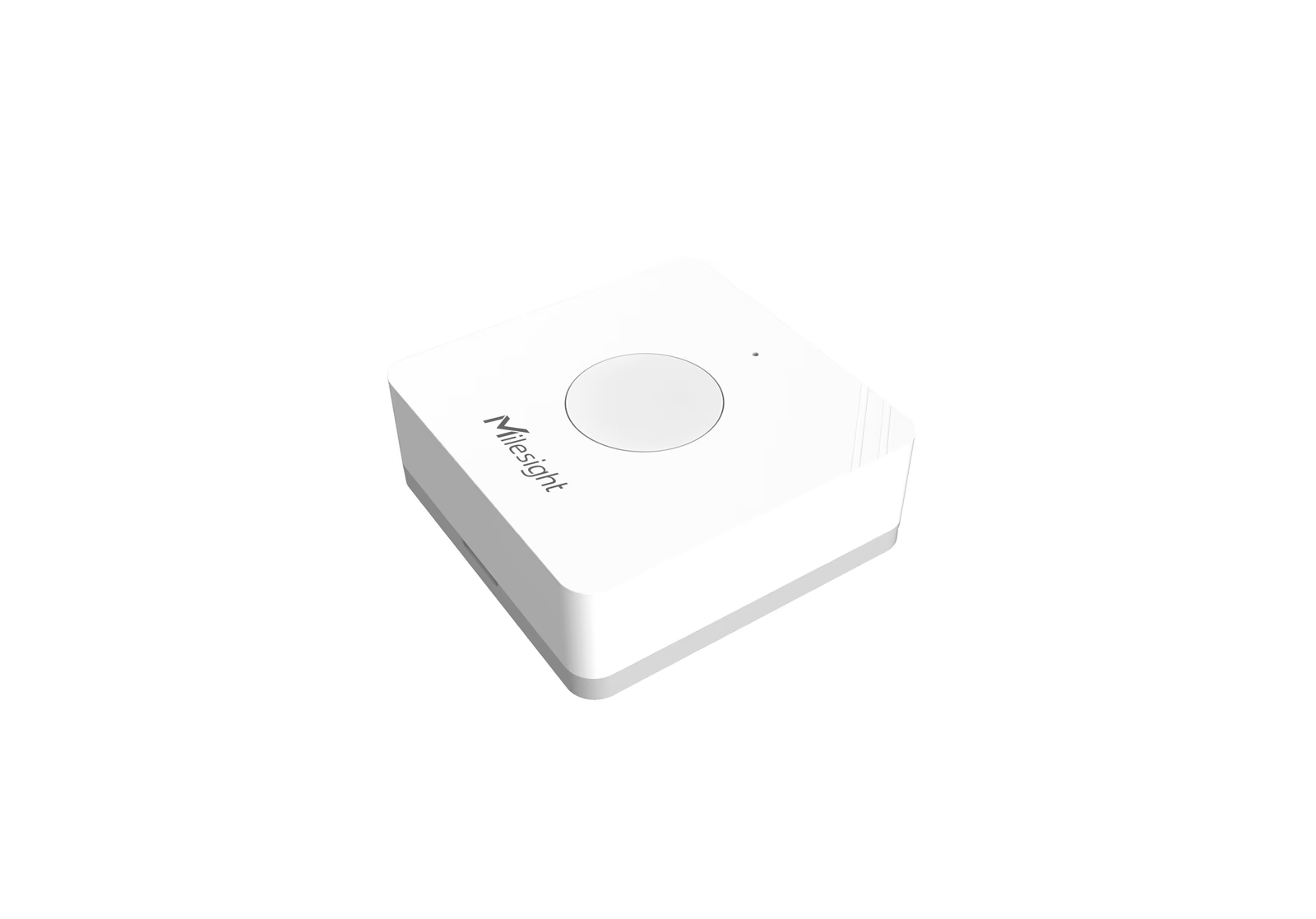
Milesight WS101 Smart Button
The WS101 is a 50 mm square node powered by a replaceable 2/3 AA cell rated for up to five years of service. It reports three press actions — short at three seconds or less, long above three seconds, and double — each mappable to a different LoRaWAN payload or D2D command. Functionally it behaves as a wireless smart push button switch, so the WS101 needs no back-box wiring and mounts with adhesive or screws. A red-button SOS variant ships for duress and lone-worker applications, while the white Scene variant handles routine wireless control. An IP30 enclosure, built-in buzzer and LED status indicator complete the hardware, making this button quick to commission over NFC.
WS136 & WS156 Smart Scene Panel
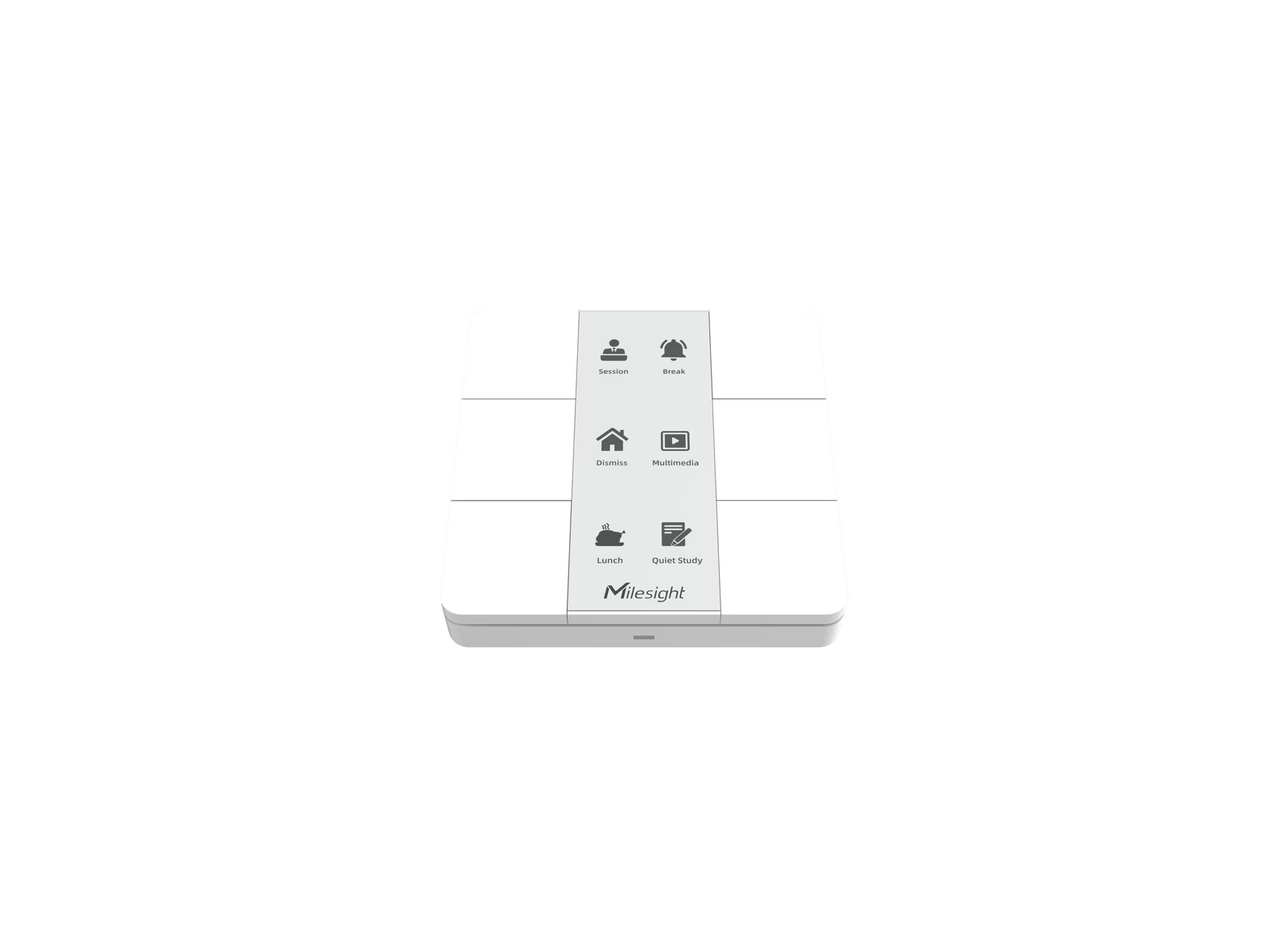
The WS136 and WS156 extend the WS101 concept into a six-button smart wall panel for scene recall. Each button on these smart wall panels can be assigned independently to either a LoRaWAN uplink or a Milesight D2D command, so one panel can drive multiple relay switches and sensors at once. Both behave as multi-gang LoRaWAN button panels with sub-second D2D response. Either panel can also report its own battery and tamper status. The WS156 carries a 2.9-inch black-and-white E-ink display at 128 × 296 pixels that re-labels scenes on demand and performs a weekly full refresh to clear ghosting; the WS136 uses a made-to-order PVC fascia for fixed labelling. A single press can recall an entire scene spanning lighting and in-room sensing [Link to: Smart Room Sensors & Controls Sub-Category Page].
Milesight WS558 Smart Light Controller
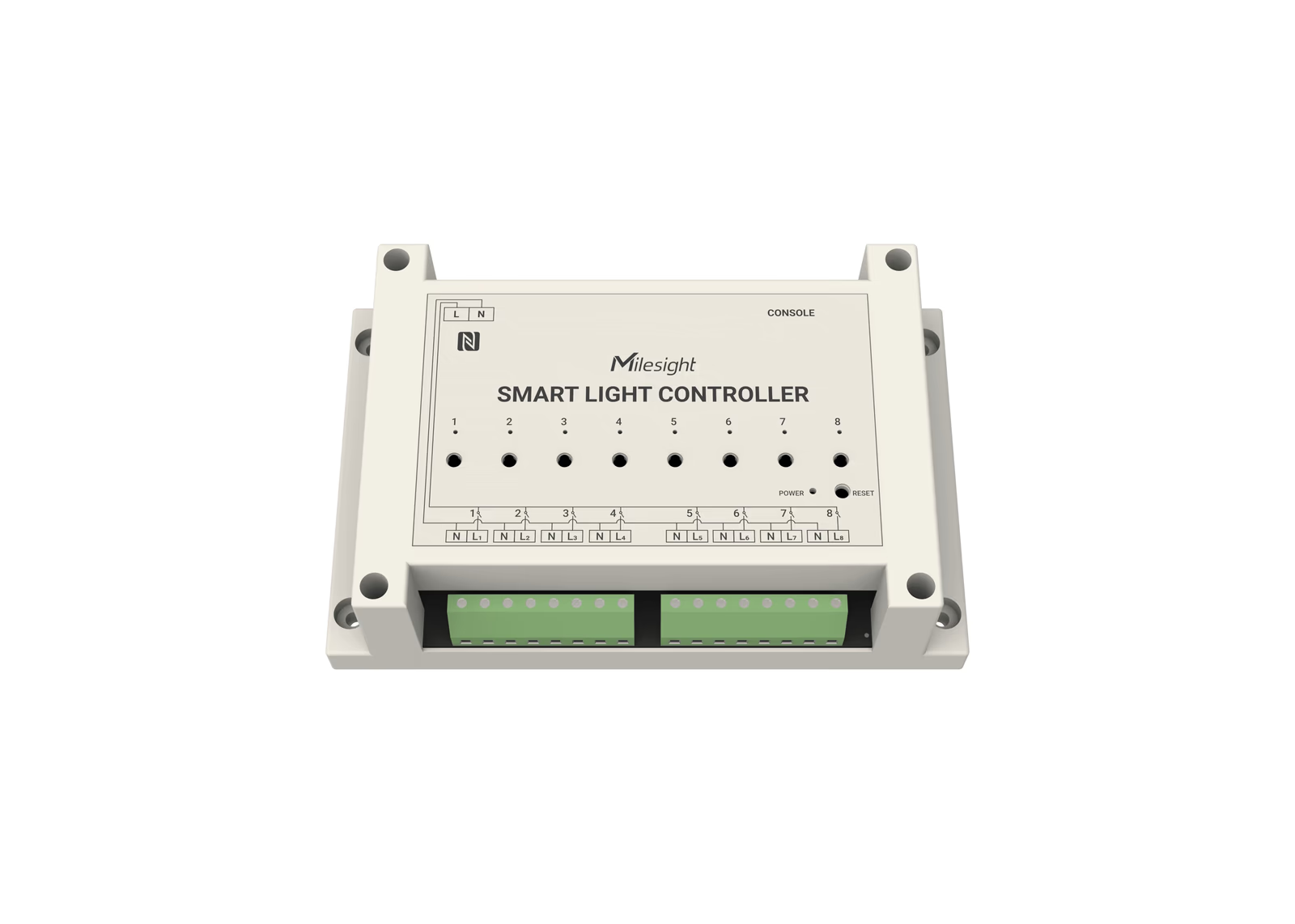
For switching, the WS558 smart light controller drives up to eight lighting circuits from one DIN- or wall-mounted unit — the switching backbone of centralised commercial lighting control. It ships in two wiring forms: an LN (Live-Neutral) type that adds per-circuit energy measurement, and a switch type for live-only retrofits where no neutral is available. Each channel carries up to 5 A at 100–240 V AC, with built-in overcurrent protection against short circuits and overload, plus power-off memory that restores the last relay state after an outage. As a LoRaWAN relay switch it accepts up to 16 D2D commands, so a wall panel or LoRaWAN button can switch entire zones locally. The LN variant resolves voltage to 0.1 V, current to 1 mA and energy to 0.001 kWh — feeding straight into circuit-level energy metering [Link to: Power & Energy Sub-Category Page]. Full specifications are published on the Milesight WS558 product page.
Milesight WS523 Portable Socket
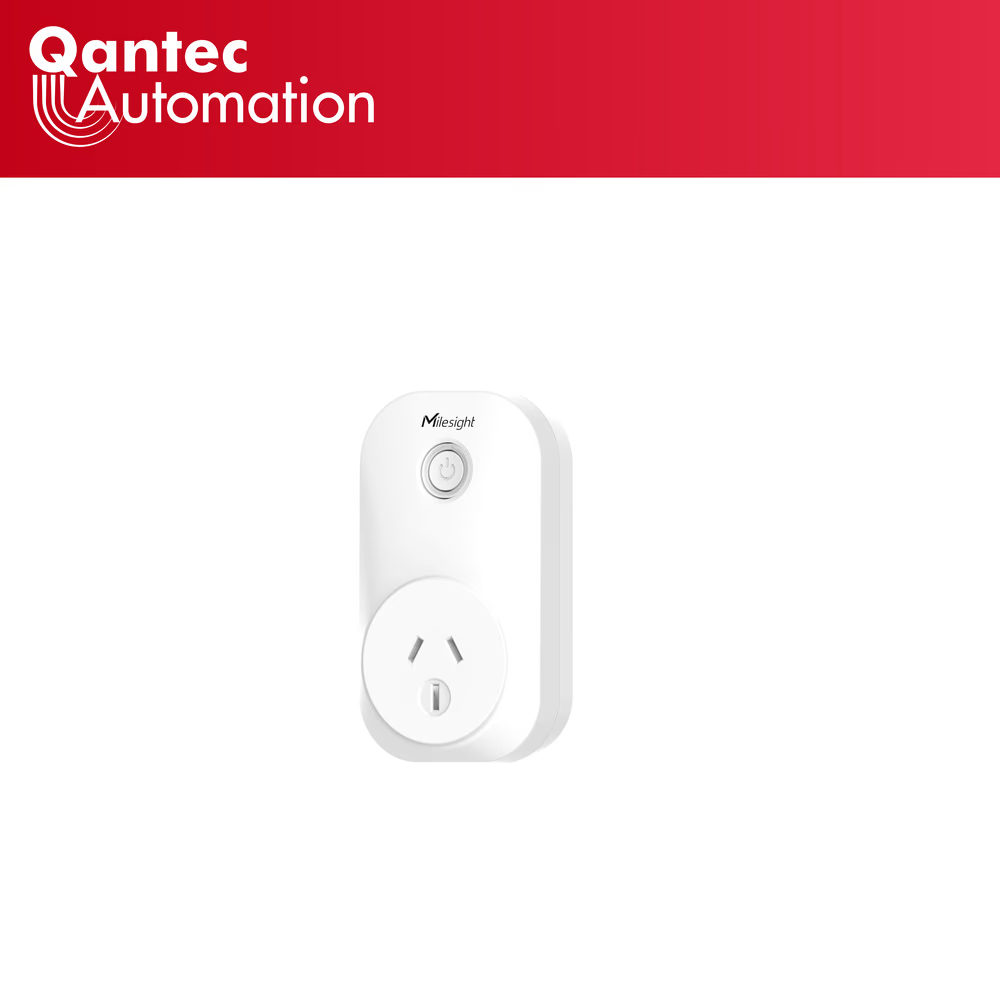
The WS523 portable socket brings the same switching and metering to plug-in loads. Configured for the Australian 10 A socket standard, it measures voltage, current, power factor, active power and consumption to ±3% typical accuracy, and trips on overload. A built-in capacitor fires a power-outage alert before the device loses power. Like the relay switch, it runs Class C for always-on downlink control and supports the Milesight D2D protocol.
Range at a Glance
All units are LoRaWAN Class A or C nodes with Milesight D2D on AU915.
| <w:tcBorders><w:top w:color="c9d3dd" w:space="0" w:sz="4" w:val="single"/><w:left w:color="c9d3dd" w:space="0" w:sz="4" w:val="single"/><w:bottom w:color="c9d3dd" w:space="0" w:sz="4" w:val="single"/><w:right w:color="c9d3dd" w:space="0" w:sz="4" w:val="single"/></w:tcBorders><w:shd w:fill="dce6f1" w:val="clear"/><w:tcMar><w:top w:w="70.0" w:type="dxa"/><w:left w:w="110.0" w:type="dxa"/><w:bottom w:w="70.0" w:type="dxa"/><w:right w:w="110.0" w:type="dxa"/></w:tcMar><w:vAlign w:val="center"/></w:tcPr><w:p w:rsidR="00000000" w:rsidDel="00000000" w:rsidP="00000000" w:rsidRDefault="00000000" w:rsidRPr="00000000" w14:paraId="00000029"><w:pPr><w:rPr/></w:pPr><w:r w:rsidDel="00000000" w:rsidR="00000000" w:rsidRPr="00000000"><w:rPr><w:b w:val="1"/><w:bCs w:val="1"/><w:color w:val="1f4e79"/><w:sz w:val="18"/><w:szCs w:val="18"/><w:rtl w:val="0"/></w:rPr><w:t xml:space="preserve">Model | <w:tcBorders><w:top w:color="c9d3dd" w:space="0" w:sz="4" w:val="single"/><w:left w:color="c9d3dd" w:space="0" w:sz="4" w:val="single"/><w:bottom w:color="c9d3dd" w:space="0" w:sz="4" w:val="single"/><w:right w:color="c9d3dd" w:space="0" w:sz="4" w:val="single"/></w:tcBorders><w:shd w:fill="dce6f1" w:val="clear"/><w:tcMar><w:top w:w="70.0" w:type="dxa"/><w:left w:w="110.0" w:type="dxa"/><w:bottom w:w="70.0" w:type="dxa"/><w:right w:w="110.0" w:type="dxa"/></w:tcMar><w:vAlign w:val="center"/></w:tcPr><w:p w:rsidR="00000000" w:rsidDel="00000000" w:rsidP="00000000" w:rsidRDefault="00000000" w:rsidRPr="00000000" w14:paraId="0000002A"><w:pPr><w:rPr/></w:pPr><w:r w:rsidDel="00000000" w:rsidR="00000000" w:rsidRPr="00000000"><w:rPr><w:b w:val="1"/><w:bCs w:val="1"/><w:color w:val="1f4e79"/><w:sz w:val="18"/><w:szCs w:val="18"/><w:rtl w:val="0"/></w:rPr><w:t xml:space="preserve">Form factor | <w:tcBorders><w:top w:color="c9d3dd" w:space="0" w:sz="4" w:val="single"/><w:left w:color="c9d3dd" w:space="0" w:sz="4" w:val="single"/><w:bottom w:color="c9d3dd" w:space="0" w:sz="4" w:val="single"/><w:right w:color="c9d3dd" w:space="0" w:sz="4" w:val="single"/></w:tcBorders><w:shd w:fill="dce6f1" w:val="clear"/><w:tcMar><w:top w:w="70.0" w:type="dxa"/><w:left w:w="110.0" w:type="dxa"/><w:bottom w:w="70.0" w:type="dxa"/><w:right w:w="110.0" w:type="dxa"/></w:tcMar><w:vAlign w:val="center"/></w:tcPr><w:p w:rsidR="00000000" w:rsidDel="00000000" w:rsidP="00000000" w:rsidRDefault="00000000" w:rsidRPr="00000000" w14:paraId="0000002B"><w:pPr><w:rPr/></w:pPr><w:r w:rsidDel="00000000" w:rsidR="00000000" w:rsidRPr="00000000"><w:rPr><w:b w:val="1"/><w:bCs w:val="1"/><w:color w:val="1f4e79"/><w:sz w:val="18"/><w:szCs w:val="18"/><w:rtl w:val="0"/></w:rPr><w:t xml:space="preserve">Protocol & Class | <w:tcBorders><w:top w:color="c9d3dd" w:space="0" w:sz="4" w:val="single"/><w:left w:color="c9d3dd" w:space="0" w:sz="4" w:val="single"/><w:bottom w:color="c9d3dd" w:space="0" w:sz="4" w:val="single"/><w:right w:color="c9d3dd" w:space="0" w:sz="4" w:val="single"/></w:tcBorders><w:shd w:fill="dce6f1" w:val="clear"/><w:tcMar><w:top w:w="70.0" w:type="dxa"/><w:left w:w="110.0" w:type="dxa"/><w:bottom w:w="70.0" w:type="dxa"/><w:right w:w="110.0" w:type="dxa"/></w:tcMar><w:vAlign w:val="center"/></w:tcPr><w:p w:rsidR="00000000" w:rsidDel="00000000" w:rsidP="00000000" w:rsidRDefault="00000000" w:rsidRPr="00000000" w14:paraId="0000002C"><w:pPr><w:rPr/></w:pPr><w:r w:rsidDel="00000000" w:rsidR="00000000" w:rsidRPr="00000000"><w:rPr><w:b w:val="1"/><w:bCs w:val="1"/><w:color w:val="1f4e79"/><w:sz w:val="18"/><w:szCs w:val="18"/><w:rtl w:val="0"/></w:rPr><w:t xml:space="preserve">Headline capability | <w:tcBorders><w:top w:color="c9d3dd" w:space="0" w:sz="4" w:val="single"/><w:left w:color="c9d3dd" w:space="0" w:sz="4" w:val="single"/><w:bottom w:color="c9d3dd" w:space="0" w:sz="4" w:val="single"/><w:right w:color="c9d3dd" w:space="0" w:sz="4" w:val="single"/></w:tcBorders><w:shd w:fill="dce6f1" w:val="clear"/><w:tcMar><w:top w:w="70.0" w:type="dxa"/><w:left w:w="110.0" w:type="dxa"/><w:bottom w:w="70.0" w:type="dxa"/><w:right w:w="110.0" w:type="dxa"/></w:tcMar><w:vAlign w:val="center"/></w:tcPr><w:p w:rsidR="00000000" w:rsidDel="00000000" w:rsidP="00000000" w:rsidRDefault="00000000" w:rsidRPr="00000000" w14:paraId="0000002D"><w:pPr><w:rPr/></w:pPr><w:r w:rsidDel="00000000" w:rsidR="00000000" w:rsidRPr="00000000"><w:rPr><w:b w:val="1"/><w:bCs w:val="1"/><w:color w:val="1f4e79"/><w:sz w:val="18"/><w:szCs w:val="18"/><w:rtl w:val="0"/></w:rPr><w:t xml:space="preserve">Power |
|---|---|---|---|---|
| <w:tcBorders><w:top w:color="c9d3dd" w:space="0" w:sz="4" w:val="single"/><w:left w:color="c9d3dd" w:space="0" w:sz="4" w:val="single"/><w:bottom w:color="c9d3dd" w:space="0" w:sz="4" w:val="single"/><w:right w:color="c9d3dd" w:space="0" w:sz="4" w:val="single"/></w:tcBorders><w:shd w:fill="ffffff" w:val="clear"/><w:tcMar><w:top w:w="70.0" w:type="dxa"/><w:left w:w="110.0" w:type="dxa"/><w:bottom w:w="70.0" w:type="dxa"/><w:right w:w="110.0" w:type="dxa"/></w:tcMar><w:vAlign w:val="center"/></w:tcPr><w:p w:rsidR="00000000" w:rsidDel="00000000" w:rsidP="00000000" w:rsidRDefault="00000000" w:rsidRPr="00000000" w14:paraId="0000002E"><w:pPr><w:rPr/></w:pPr><w:r w:rsidDel="00000000" w:rsidR="00000000" w:rsidRPr="00000000"><w:rPr><w:b w:val="0"/><w:bCs w:val="0"/><w:color w:val="222222"/><w:sz w:val="18"/><w:szCs w:val="18"/><w:rtl w:val="0"/></w:rPr><w:t xml:space="preserve">WS101 Smart Button | <w:tcBorders><w:top w:color="c9d3dd" w:space="0" w:sz="4" w:val="single"/><w:left w:color="c9d3dd" w:space="0" w:sz="4" w:val="single"/><w:bottom w:color="c9d3dd" w:space="0" w:sz="4" w:val="single"/><w:right w:color="c9d3dd" w:space="0" w:sz="4" w:val="single"/></w:tcBorders><w:shd w:fill="ffffff" w:val="clear"/><w:tcMar><w:top w:w="70.0" w:type="dxa"/><w:left w:w="110.0" w:type="dxa"/><w:bottom w:w="70.0" w:type="dxa"/><w:right w:w="110.0" w:type="dxa"/></w:tcMar><w:vAlign w:val="center"/></w:tcPr><w:p w:rsidR="00000000" w:rsidDel="00000000" w:rsidP="00000000" w:rsidRDefault="00000000" w:rsidRPr="00000000" w14:paraId="0000002F"><w:pPr><w:rPr/></w:pPr><w:r w:rsidDel="00000000" w:rsidR="00000000" w:rsidRPr="00000000"><w:rPr><w:b w:val="0"/><w:bCs w:val="0"/><w:color w:val="222222"/><w:sz w:val="18"/><w:szCs w:val="18"/><w:rtl w:val="0"/></w:rPr><w:t xml:space="preserve">50 mm button node | <w:tcBorders><w:top w:color="c9d3dd" w:space="0" w:sz="4" w:val="single"/><w:left w:color="c9d3dd" w:space="0" w:sz="4" w:val="single"/><w:bottom w:color="c9d3dd" w:space="0" w:sz="4" w:val="single"/><w:right w:color="c9d3dd" w:space="0" w:sz="4" w:val="single"/></w:tcBorders><w:shd w:fill="ffffff" w:val="clear"/><w:tcMar><w:top w:w="70.0" w:type="dxa"/><w:left w:w="110.0" w:type="dxa"/><w:bottom w:w="70.0" w:type="dxa"/><w:right w:w="110.0" w:type="dxa"/></w:tcMar><w:vAlign w:val="center"/></w:tcPr><w:p w:rsidR="00000000" w:rsidDel="00000000" w:rsidP="00000000" w:rsidRDefault="00000000" w:rsidRPr="00000000" w14:paraId="00000030"><w:pPr><w:rPr/></w:pPr><w:r w:rsidDel="00000000" w:rsidR="00000000" w:rsidRPr="00000000"><w:rPr><w:b w:val="0"/><w:bCs w:val="0"/><w:color w:val="222222"/><w:sz w:val="18"/><w:szCs w:val="18"/><w:rtl w:val="0"/></w:rPr><w:t xml:space="preserve">LoRaWAN Class A + D2D | <w:tcBorders><w:top w:color="c9d3dd" w:space="0" w:sz="4" w:val="single"/><w:left w:color="c9d3dd" w:space="0" w:sz="4" w:val="single"/><w:bottom w:color="c9d3dd" w:space="0" w:sz="4" w:val="single"/><w:right w:color="c9d3dd" w:space="0" w:sz="4" w:val="single"/></w:tcBorders><w:shd w:fill="ffffff" w:val="clear"/><w:tcMar><w:top w:w="70.0" w:type="dxa"/><w:left w:w="110.0" w:type="dxa"/><w:bottom w:w="70.0" w:type="dxa"/><w:right w:w="110.0" w:type="dxa"/></w:tcMar><w:vAlign w:val="center"/></w:tcPr><w:p w:rsidR="00000000" w:rsidDel="00000000" w:rsidP="00000000" w:rsidRDefault="00000000" w:rsidRPr="00000000" w14:paraId="00000031"><w:pPr><w:rPr/></w:pPr><w:r w:rsidDel="00000000" w:rsidR="00000000" w:rsidRPr="00000000"><w:rPr><w:b w:val="0"/><w:bCs w:val="0"/><w:color w:val="222222"/><w:sz w:val="18"/><w:szCs w:val="18"/><w:rtl w:val="0"/></w:rPr><w:t xml:space="preserve">3 press actions; optional red SOS variant | <w:tcBorders><w:top w:color="c9d3dd" w:space="0" w:sz="4" w:val="single"/><w:left w:color="c9d3dd" w:space="0" w:sz="4" w:val="single"/><w:bottom w:color="c9d3dd" w:space="0" w:sz="4" w:val="single"/><w:right w:color="c9d3dd" w:space="0" w:sz="4" w:val="single"/></w:tcBorders><w:shd w:fill="ffffff" w:val="clear"/><w:tcMar><w:top w:w="70.0" w:type="dxa"/><w:left w:w="110.0" w:type="dxa"/><w:bottom w:w="70.0" w:type="dxa"/><w:right w:w="110.0" w:type="dxa"/></w:tcMar><w:vAlign w:val="center"/></w:tcPr><w:p w:rsidR="00000000" w:rsidDel="00000000" w:rsidP="00000000" w:rsidRDefault="00000000" w:rsidRPr="00000000" w14:paraId="00000032"><w:pPr><w:rPr/></w:pPr><w:r w:rsidDel="00000000" w:rsidR="00000000" w:rsidRPr="00000000"><w:rPr><w:b w:val="0"/><w:bCs w:val="0"/><w:color w:val="222222"/><w:sz w:val="18"/><w:szCs w:val="18"/><w:rtl w:val="0"/></w:rPr><w:t xml:space="preserve">2/3 AA, ~5 yr |
| <w:tcBorders><w:top w:color="c9d3dd" w:space="0" w:sz="4" w:val="single"/><w:left w:color="c9d3dd" w:space="0" w:sz="4" w:val="single"/><w:bottom w:color="c9d3dd" w:space="0" w:sz="4" w:val="single"/><w:right w:color="c9d3dd" w:space="0" w:sz="4" w:val="single"/></w:tcBorders><w:shd w:fill="ffffff" w:val="clear"/><w:tcMar><w:top w:w="70.0" w:type="dxa"/><w:left w:w="110.0" w:type="dxa"/><w:bottom w:w="70.0" w:type="dxa"/><w:right w:w="110.0" w:type="dxa"/></w:tcMar><w:vAlign w:val="center"/></w:tcPr><w:p w:rsidR="00000000" w:rsidDel="00000000" w:rsidP="00000000" w:rsidRDefault="00000000" w:rsidRPr="00000000" w14:paraId="00000033"><w:pPr><w:rPr/></w:pPr><w:r w:rsidDel="00000000" w:rsidR="00000000" w:rsidRPr="00000000"><w:rPr><w:b w:val="0"/><w:bCs w:val="0"/><w:color w:val="222222"/><w:sz w:val="18"/><w:szCs w:val="18"/><w:rtl w:val="0"/></w:rPr><w:t xml:space="preserve">WS136 / WS156 Scene Panel | <w:tcBorders><w:top w:color="c9d3dd" w:space="0" w:sz="4" w:val="single"/><w:left w:color="c9d3dd" w:space="0" w:sz="4" w:val="single"/><w:bottom w:color="c9d3dd" w:space="0" w:sz="4" w:val="single"/><w:right w:color="c9d3dd" w:space="0" w:sz="4" w:val="single"/></w:tcBorders><w:shd w:fill="ffffff" w:val="clear"/><w:tcMar><w:top w:w="70.0" w:type="dxa"/><w:left w:w="110.0" w:type="dxa"/><w:bottom w:w="70.0" w:type="dxa"/><w:right w:w="110.0" w:type="dxa"/></w:tcMar><w:vAlign w:val="center"/></w:tcPr><w:p w:rsidR="00000000" w:rsidDel="00000000" w:rsidP="00000000" w:rsidRDefault="00000000" w:rsidRPr="00000000" w14:paraId="00000034"><w:pPr><w:rPr/></w:pPr><w:r w:rsidDel="00000000" w:rsidR="00000000" w:rsidRPr="00000000"><w:rPr><w:b w:val="0"/><w:bCs w:val="0"/><w:color w:val="222222"/><w:sz w:val="18"/><w:szCs w:val="18"/><w:rtl w:val="0"/></w:rPr><w:t xml:space="preserve">6-button wall panel | <w:tcBorders><w:top w:color="c9d3dd" w:space="0" w:sz="4" w:val="single"/><w:left w:color="c9d3dd" w:space="0" w:sz="4" w:val="single"/><w:bottom w:color="c9d3dd" w:space="0" w:sz="4" w:val="single"/><w:right w:color="c9d3dd" w:space="0" w:sz="4" w:val="single"/></w:tcBorders><w:shd w:fill="ffffff" w:val="clear"/><w:tcMar><w:top w:w="70.0" w:type="dxa"/><w:left w:w="110.0" w:type="dxa"/><w:bottom w:w="70.0" w:type="dxa"/><w:right w:w="110.0" w:type="dxa"/></w:tcMar><w:vAlign w:val="center"/></w:tcPr><w:p w:rsidR="00000000" w:rsidDel="00000000" w:rsidP="00000000" w:rsidRDefault="00000000" w:rsidRPr="00000000" w14:paraId="00000035"><w:pPr><w:rPr/></w:pPr><w:r w:rsidDel="00000000" w:rsidR="00000000" w:rsidRPr="00000000"><w:rPr><w:b w:val="0"/><w:bCs w:val="0"/><w:color w:val="222222"/><w:sz w:val="18"/><w:szCs w:val="18"/><w:rtl w:val="0"/></w:rPr><w:t xml:space="preserve">LoRaWAN Class A + D2D | <w:tcBorders><w:top w:color="c9d3dd" w:space="0" w:sz="4" w:val="single"/><w:left w:color="c9d3dd" w:space="0" w:sz="4" w:val="single"/><w:bottom w:color="c9d3dd" w:space="0" w:sz="4" w:val="single"/><w:right w:color="c9d3dd" w:space="0" w:sz="4" w:val="single"/></w:tcBorders><w:shd w:fill="ffffff" w:val="clear"/><w:tcMar><w:top w:w="70.0" w:type="dxa"/><w:left w:w="110.0" w:type="dxa"/><w:bottom w:w="70.0" w:type="dxa"/><w:right w:w="110.0" w:type="dxa"/></w:tcMar><w:vAlign w:val="center"/></w:tcPr><w:p w:rsidR="00000000" w:rsidDel="00000000" w:rsidP="00000000" w:rsidRDefault="00000000" w:rsidRPr="00000000" w14:paraId="00000036"><w:pPr><w:rPr/></w:pPr><w:r w:rsidDel="00000000" w:rsidR="00000000" w:rsidRPr="00000000"><w:rPr><w:b w:val="0"/><w:bCs w:val="0"/><w:color w:val="222222"/><w:sz w:val="18"/><w:szCs w:val="18"/><w:rtl w:val="0"/></w:rPr><w:t xml:space="preserve">6 scenes; WS156 E-ink 128×296 px | <w:tcBorders><w:top w:color="c9d3dd" w:space="0" w:sz="4" w:val="single"/><w:left w:color="c9d3dd" w:space="0" w:sz="4" w:val="single"/><w:bottom w:color="c9d3dd" w:space="0" w:sz="4" w:val="single"/><w:right w:color="c9d3dd" w:space="0" w:sz="4" w:val="single"/></w:tcBorders><w:shd w:fill="ffffff" w:val="clear"/><w:tcMar><w:top w:w="70.0" w:type="dxa"/><w:left w:w="110.0" w:type="dxa"/><w:bottom w:w="70.0" w:type="dxa"/><w:right w:w="110.0" w:type="dxa"/></w:tcMar><w:vAlign w:val="center"/></w:tcPr><w:p w:rsidR="00000000" w:rsidDel="00000000" w:rsidP="00000000" w:rsidRDefault="00000000" w:rsidRPr="00000000" w14:paraId="00000037"><w:pPr><w:rPr/></w:pPr><w:r w:rsidDel="00000000" w:rsidR="00000000" w:rsidRPr="00000000"><w:rPr><w:b w:val="0"/><w:bCs w:val="0"/><w:color w:val="222222"/><w:sz w:val="18"/><w:szCs w:val="18"/><w:rtl w:val="0"/></w:rPr><w:t xml:space="preserve">Battery |
| <w:tcBorders><w:top w:color="c9d3dd" w:space="0" w:sz="4" w:val="single"/><w:left w:color="c9d3dd" w:space="0" w:sz="4" w:val="single"/><w:bottom w:color="c9d3dd" w:space="0" w:sz="4" w:val="single"/><w:right w:color="c9d3dd" w:space="0" w:sz="4" w:val="single"/></w:tcBorders><w:shd w:fill="ffffff" w:val="clear"/><w:tcMar><w:top w:w="70.0" w:type="dxa"/><w:left w:w="110.0" w:type="dxa"/><w:bottom w:w="70.0" w:type="dxa"/><w:right w:w="110.0" w:type="dxa"/></w:tcMar><w:vAlign w:val="center"/></w:tcPr><w:p w:rsidR="00000000" w:rsidDel="00000000" w:rsidP="00000000" w:rsidRDefault="00000000" w:rsidRPr="00000000" w14:paraId="00000038"><w:pPr><w:rPr/></w:pPr><w:r w:rsidDel="00000000" w:rsidR="00000000" w:rsidRPr="00000000"><w:rPr><w:b w:val="0"/><w:bCs w:val="0"/><w:color w:val="222222"/><w:sz w:val="18"/><w:szCs w:val="18"/><w:rtl w:val="0"/></w:rPr><w:t xml:space="preserve">WS558 Smart Light Controller | <w:tcBorders><w:top w:color="c9d3dd" w:space="0" w:sz="4" w:val="single"/><w:left w:color="c9d3dd" w:space="0" w:sz="4" w:val="single"/><w:bottom w:color="c9d3dd" w:space="0" w:sz="4" w:val="single"/><w:right w:color="c9d3dd" w:space="0" w:sz="4" w:val="single"/></w:tcBorders><w:shd w:fill="ffffff" w:val="clear"/><w:tcMar><w:top w:w="70.0" w:type="dxa"/><w:left w:w="110.0" w:type="dxa"/><w:bottom w:w="70.0" w:type="dxa"/><w:right w:w="110.0" w:type="dxa"/></w:tcMar><w:vAlign w:val="center"/></w:tcPr><w:p w:rsidR="00000000" w:rsidDel="00000000" w:rsidP="00000000" w:rsidRDefault="00000000" w:rsidRPr="00000000" w14:paraId="00000039"><w:pPr><w:rPr/></w:pPr><w:r w:rsidDel="00000000" w:rsidR="00000000" w:rsidRPr="00000000"><w:rPr><w:b w:val="0"/><w:bCs w:val="0"/><w:color w:val="222222"/><w:sz w:val="18"/><w:szCs w:val="18"/><w:rtl w:val="0"/></w:rPr><w:t xml:space="preserve">8-ch DIN / wall unit | <w:tcBorders><w:top w:color="c9d3dd" w:space="0" w:sz="4" w:val="single"/><w:left w:color="c9d3dd" w:space="0" w:sz="4" w:val="single"/><w:bottom w:color="c9d3dd" w:space="0" w:sz="4" w:val="single"/><w:right w:color="c9d3dd" w:space="0" w:sz="4" w:val="single"/></w:tcBorders><w:shd w:fill="ffffff" w:val="clear"/><w:tcMar><w:top w:w="70.0" w:type="dxa"/><w:left w:w="110.0" w:type="dxa"/><w:bottom w:w="70.0" w:type="dxa"/><w:right w:w="110.0" w:type="dxa"/></w:tcMar><w:vAlign w:val="center"/></w:tcPr><w:p w:rsidR="00000000" w:rsidDel="00000000" w:rsidP="00000000" w:rsidRDefault="00000000" w:rsidRPr="00000000" w14:paraId="0000003A"><w:pPr><w:rPr/></w:pPr><w:r w:rsidDel="00000000" w:rsidR="00000000" w:rsidRPr="00000000"><w:rPr><w:b w:val="0"/><w:bCs w:val="0"/><w:color w:val="222222"/><w:sz w:val="18"/><w:szCs w:val="18"/><w:rtl w:val="0"/></w:rPr><w:t xml:space="preserve">LoRaWAN Class C + D2D | <w:tcBorders><w:top w:color="c9d3dd" w:space="0" w:sz="4" w:val="single"/><w:left w:color="c9d3dd" w:space="0" w:sz="4" w:val="single"/><w:bottom w:color="c9d3dd" w:space="0" w:sz="4" w:val="single"/><w:right w:color="c9d3dd" w:space="0" w:sz="4" w:val="single"/></w:tcBorders><w:shd w:fill="ffffff" w:val="clear"/><w:tcMar><w:top w:w="70.0" w:type="dxa"/><w:left w:w="110.0" w:type="dxa"/><w:bottom w:w="70.0" w:type="dxa"/><w:right w:w="110.0" w:type="dxa"/></w:tcMar><w:vAlign w:val="center"/></w:tcPr><w:p w:rsidR="00000000" w:rsidDel="00000000" w:rsidP="00000000" w:rsidRDefault="00000000" w:rsidRPr="00000000" w14:paraId="0000003B"><w:pPr><w:rPr/></w:pPr><w:r w:rsidDel="00000000" w:rsidR="00000000" w:rsidRPr="00000000"><w:rPr><w:b w:val="0"/><w:bCs w:val="0"/><w:color w:val="222222"/><w:sz w:val="18"/><w:szCs w:val="18"/><w:rtl w:val="0"/></w:rPr><w:t xml:space="preserve">8 circuits; LN metering; 5 A per channel | <w:tcBorders><w:top w:color="c9d3dd" w:space="0" w:sz="4" w:val="single"/><w:left w:color="c9d3dd" w:space="0" w:sz="4" w:val="single"/><w:bottom w:color="c9d3dd" w:space="0" w:sz="4" w:val="single"/><w:right w:color="c9d3dd" w:space="0" w:sz="4" w:val="single"/></w:tcBorders><w:shd w:fill="ffffff" w:val="clear"/><w:tcMar><w:top w:w="70.0" w:type="dxa"/><w:left w:w="110.0" w:type="dxa"/><w:bottom w:w="70.0" w:type="dxa"/><w:right w:w="110.0" w:type="dxa"/></w:tcMar><w:vAlign w:val="center"/></w:tcPr><w:p w:rsidR="00000000" w:rsidDel="00000000" w:rsidP="00000000" w:rsidRDefault="00000000" w:rsidRPr="00000000" w14:paraId="0000003C"><w:pPr><w:rPr/></w:pPr><w:r w:rsidDel="00000000" w:rsidR="00000000" w:rsidRPr="00000000"><w:rPr><w:b w:val="0"/><w:bCs w:val="0"/><w:color w:val="222222"/><w:sz w:val="18"/><w:szCs w:val="18"/><w:rtl w:val="0"/></w:rPr><w:t xml:space="preserve">100–240 V AC |
| <w:tcBorders><w:top w:color="c9d3dd" w:space="0" w:sz="4" w:val="single"/><w:left w:color="c9d3dd" w:space="0" w:sz="4" w:val="single"/><w:bottom w:color="c9d3dd" w:space="0" w:sz="4" w:val="single"/><w:right w:color="c9d3dd" w:space="0" w:sz="4" w:val="single"/></w:tcBorders><w:shd w:fill="ffffff" w:val="clear"/><w:tcMar><w:top w:w="70.0" w:type="dxa"/><w:left w:w="110.0" w:type="dxa"/><w:bottom w:w="70.0" w:type="dxa"/><w:right w:w="110.0" w:type="dxa"/></w:tcMar><w:vAlign w:val="center"/></w:tcPr><w:p w:rsidR="00000000" w:rsidDel="00000000" w:rsidP="00000000" w:rsidRDefault="00000000" w:rsidRPr="00000000" w14:paraId="0000003D"><w:pPr><w:rPr/></w:pPr><w:r w:rsidDel="00000000" w:rsidR="00000000" w:rsidRPr="00000000"><w:rPr><w:b w:val="0"/><w:bCs w:val="0"/><w:color w:val="222222"/><w:sz w:val="18"/><w:szCs w:val="18"/><w:rtl w:val="0"/></w:rPr><w:t xml:space="preserve">WS523 Portable Socket | <w:tcBorders><w:top w:color="c9d3dd" w:space="0" w:sz="4" w:val="single"/><w:left w:color="c9d3dd" w:space="0" w:sz="4" w:val="single"/><w:bottom w:color="c9d3dd" w:space="0" w:sz="4" w:val="single"/><w:right w:color="c9d3dd" w:space="0" w:sz="4" w:val="single"/></w:tcBorders><w:shd w:fill="ffffff" w:val="clear"/><w:tcMar><w:top w:w="70.0" w:type="dxa"/><w:left w:w="110.0" w:type="dxa"/><w:bottom w:w="70.0" w:type="dxa"/><w:right w:w="110.0" w:type="dxa"/></w:tcMar><w:vAlign w:val="center"/></w:tcPr><w:p w:rsidR="00000000" w:rsidDel="00000000" w:rsidP="00000000" w:rsidRDefault="00000000" w:rsidRPr="00000000" w14:paraId="0000003E"><w:pPr><w:rPr/></w:pPr><w:r w:rsidDel="00000000" w:rsidR="00000000" w:rsidRPr="00000000"><w:rPr><w:b w:val="0"/><w:bCs w:val="0"/><w:color w:val="222222"/><w:sz w:val="18"/><w:szCs w:val="18"/><w:rtl w:val="0"/></w:rPr><w:t xml:space="preserve">Plug-in metered socket | <w:tcBorders><w:top w:color="c9d3dd" w:space="0" w:sz="4" w:val="single"/><w:left w:color="c9d3dd" w:space="0" w:sz="4" w:val="single"/><w:bottom w:color="c9d3dd" w:space="0" w:sz="4" w:val="single"/><w:right w:color="c9d3dd" w:space="0" w:sz="4" w:val="single"/></w:tcBorders><w:shd w:fill="ffffff" w:val="clear"/><w:tcMar><w:top w:w="70.0" w:type="dxa"/><w:left w:w="110.0" w:type="dxa"/><w:bottom w:w="70.0" w:type="dxa"/><w:right w:w="110.0" w:type="dxa"/></w:tcMar><w:vAlign w:val="center"/></w:tcPr><w:p w:rsidR="00000000" w:rsidDel="00000000" w:rsidP="00000000" w:rsidRDefault="00000000" w:rsidRPr="00000000" w14:paraId="0000003F"><w:pPr><w:rPr/></w:pPr><w:r w:rsidDel="00000000" w:rsidR="00000000" w:rsidRPr="00000000"><w:rPr><w:b w:val="0"/><w:bCs w:val="0"/><w:color w:val="222222"/><w:sz w:val="18"/><w:szCs w:val="18"/><w:rtl w:val="0"/></w:rPr><w:t xml:space="preserve">LoRaWAN Class C + D2D | <w:tcBorders><w:top w:color="c9d3dd" w:space="0" w:sz="4" w:val="single"/><w:left w:color="c9d3dd" w:space="0" w:sz="4" w:val="single"/><w:bottom w:color="c9d3dd" w:space="0" w:sz="4" w:val="single"/><w:right w:color="c9d3dd" w:space="0" w:sz="4" w:val="single"/></w:tcBorders><w:shd w:fill="ffffff" w:val="clear"/><w:tcMar><w:top w:w="70.0" w:type="dxa"/><w:left w:w="110.0" w:type="dxa"/><w:bottom w:w="70.0" w:type="dxa"/><w:right w:w="110.0" w:type="dxa"/></w:tcMar><w:vAlign w:val="center"/></w:tcPr><w:p w:rsidR="00000000" w:rsidDel="00000000" w:rsidP="00000000" w:rsidRDefault="00000000" w:rsidRPr="00000000" w14:paraId="00000040"><w:pPr><w:rPr/></w:pPr><w:r w:rsidDel="00000000" w:rsidR="00000000" w:rsidRPr="00000000"><w:rPr><w:b w:val="0"/><w:bCs w:val="0"/><w:color w:val="222222"/><w:sz w:val="18"/><w:szCs w:val="18"/><w:rtl w:val="0"/></w:rPr><w:t xml:space="preserve">AU 10 A; ±3% active-power metering | <w:tcBorders><w:top w:color="c9d3dd" w:space="0" w:sz="4" w:val="single"/><w:left w:color="c9d3dd" w:space="0" w:sz="4" w:val="single"/><w:bottom w:color="c9d3dd" w:space="0" w:sz="4" w:val="single"/><w:right w:color="c9d3dd" w:space="0" w:sz="4" w:val="single"/></w:tcBorders><w:shd w:fill="ffffff" w:val="clear"/><w:tcMar><w:top w:w="70.0" w:type="dxa"/><w:left w:w="110.0" w:type="dxa"/><w:bottom w:w="70.0" w:type="dxa"/><w:right w:w="110.0" w:type="dxa"/></w:tcMar><w:vAlign w:val="center"/></w:tcPr><w:p w:rsidR="00000000" w:rsidDel="00000000" w:rsidP="00000000" w:rsidRDefault="00000000" w:rsidRPr="00000000" w14:paraId="00000041"><w:pPr><w:rPr/></w:pPr><w:r w:rsidDel="00000000" w:rsidR="00000000" w:rsidRPr="00000000"><w:rPr><w:b w:val="0"/><w:bCs w:val="0"/><w:color w:val="222222"/><w:sz w:val="18"/><w:szCs w:val="18"/><w:rtl w:val="0"/></w:rPr><w:t xml:space="preserve">100–250 V AC |
Smart Lighting Control Systems & Australian Compliance
Commercial smart lighting control systems in Australia answer to the National Construction Code (NCC) 2022 Section J. Part J6 mandates automatic lighting control — time switches, occupancy or motion detection — in many classes of space, and the WS558 relay switch paired with a smart button or occupancy detection [Link to: Occupancy & Presence Sensors Sub-Category Page] satisfies that scheduling and switching requirement. Part J9 calls for energy-monitoring facilities; the LN-type controller and the WS523 socket feed circuit-level consumption straight into that metering obligation. For ratings, sub-metered lighting energy supports National Australian Built Environment Rating System (NABERS) Energy and Green Star Buildings v1.1 outcomes, where measured lighting power density and control drive the score.
Two further frameworks apply. Mains-side wiring of any LoRaWAN relay switch or metered socket falls under the AS/NZS 3000 Wiring Rules and must be terminated by a licensed electrician. Where a red-button unit is deployed for duress or lone-worker alerts, the response workflow should be documented under the Work Health and Safety Act 2011.
Why Specify Qantec for Smart Lighting Control Systems
Network and Firmware Security for Smart Controls
A smart control network touches the building's switching layer, so it must be segmented like any other operational-technology asset. Terminate LoRaWAN traffic on a gateway sitting in a dedicated VLAN, tunnel backhaul to the network server over a VPN, and restrict ToolBox and cloud access with role-based controls and disciplined AppKey rotation. LoRaWAN AES-128 session encryption protects payloads in transit, while signed firmware images and NFC-locked configuration guard the device itself against tampering.
Technically reviewed by Dr. Abhishek Mitra, BDM NSW (PhD, IoT Devices), Qantec Automation.
Smart Lighting Control FAQ
Do LoRaWAN smart buttons need a gateway to control lights?
Not for direct control. The Milesight D2D protocol lets a smart button or panel command a WS558 relay switch peer-to-peer in under a second with no gateway. A LoRaWAN gateway [Link to: LoRaWAN Gateway Sub-Category Page] is only required when you need cloud dashboards, scheduling or remote monitoring.
What load can the WS558 relay switch handle per channel?
Each of the WS558's eight channels switches up to 5 A at 100–240 V AC. Across all circuits that suits typical office and retail lighting zones, and overcurrent protection trips on short circuit or overload.
Can one smart button trigger several devices at once?
Yes. As a D2D controller, a single wireless smart button or scene panel sends one command that multiple D2D agent devices receive simultaneously, so one press can switch several relay switches or sockets together.
Which LoRaWAN frequency do these smart controls use in Australia?
All units run the AU915-928 plan. With Milesight gateways, set the channel index to 8–15 so the smart button, panel, controller and socket align with the gateway's default sub-band.
Footer CTA
Specify Milesight Smart Controls With Australian Stock Behind You
From a single duress button to a full floor of D2D-linked relay switches, Qantec Automation builds smart lighting control systems on verified Milesight hardware with AU915 pre-configuration and local engineering support. Send your drawings and we'll return a device schedule, gateway plan and trade price.
[ Request Trade Pricing ] [ Book a Technical Consult ] [ Download Datasheets ]
ABN 52 623 495 901
Extended FAQ
Do Milesight smart buttons and the WS558 support dimming, or only on/off switching?
The WS558 and the Milesight button range switch each circuit on, off or to an inverse state only — they do not dim. The controller is relay-based, with no 0–10V or DALI dimming output, so dimmable luminaires still need their own dimming line or a separate DALI gateway. For energy reduction without dimming, lean on scheduling, occupancy triggers and the 18-hour turn-off delay.
How far can Milesight D2D reach between a button and a relay switch without a gateway?
Milesight D2D rides the same LoRa radio layer as LoRaWAN, so a button-to-controller link covers tens of metres through internal walls and far more line-of-sight, scaling with the spreading factor you set. The controller's RX2 data rate and frequency must match the button for the peer link to work. No gateway sits in the path, but thick concrete and metal still attenuate the signal.
Is the energy data from the WS558 LN type or WS523 accurate enough for tenant billing?
No — these meters report to roughly ±3% typical accuracy and are not pattern-approved under Australia's National Measurement Institute rules, so they cannot be used for revenue billing. They are built for sub-metering insight: tracking consumption, feeding NABERS Energy and Green Star evidence, and satisfying NCC monitoring. For tenant invoicing you still need a pattern-approved utility meter.
Will the WS136 or WS156 scene panel fit a standard Australian wall box?
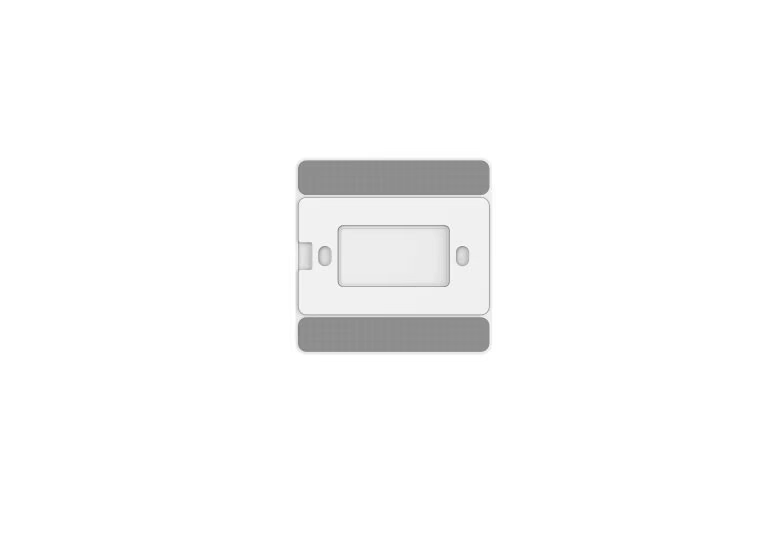
The panels fix to an 86-type back box, to 3M adhesive, or sit on a desktop, so on Australian sites the adhesive or surface mount is usually the reliable choice because local GPO boxes differ from the 86 standard. Check the back-box dimensions before specifying flush mounting, and note the screen orientation when fixing.
How do you commission dozens of these devices quickly across a site?
Milesight ToolBox supports configuration templates and backup, so one device's LoRaWAN keys, D2D keys and schedules can be written to many identical units over NFC in seconds. Templates apply only across the same model and frequency band. Request bulk device-EUI lists and random AppKeys with the order so mass commissioning stays secure.
Can a third-party LoRaWAN network server drive the WS558, or only Milesight IoT Cloud?
Any standard LoRaWAN network server can switch the WS558 through normal downlinks and multicast groups, because the device is LoRa Alliance-compliant. Only the gateway-free D2D peer mode is Milesight-specific. Published payload decoders let platforms such as ChirpStack or The Things Stack integrate the device without Milesight IoT Cloud.
What happens to lighting and scenes if the gateway goes offline?
Direct button-to-relay control keeps working through D2D during a gateway outage; only cloud dashboards, schedules and remote monitoring pause until the gateway returns. After a mains failure, the WS558's power-off memory restores each relay to its last state, and its eight local switch buttons still allow manual override.
Does the WS156 E-ink display need power to keep showing its scene labels?
No — the E-ink screen is bistable and holds its scene labels with no power draw, redrawing only when you change a label and once a week to clear ghosting. That is why the panel runs for years on battery despite carrying a display. The screen renders at 128 × 296 pixels in black and white.
Is the firmware upgrade process the same on iOS and Android?
No — Milesight ToolBox performs device firmware upgrades over NFC on Android only; iOS handles configuration but not the upgrade step. Keep a spare Android handset on site for commissioning and updates, and use the backup-and-template feature to preserve settings before any firmware change.
Section for Sufyan / Abdullah — not visible page copy. Strip before publish; implement as noted.
Open item — primary keyword discrepancy (ACTION: Abdullah)
⚠ FLAG: This brief sets primary = 'smart button' (Vol 210). The master map (row 22) sets this page's primary = 'smart lighting control systems', with 'smart button' as secondary — and the locked Meta Title leads with 'Smart Lighting Control Systems'. Page built to the brief (smart button as primary, ~1.5% density) while giving 'smart lighting control systems' full H2 + Meta + opening placement. If the master-map designation governs, density emphasis must flip — re-run required. Confirm which governs before publish.
Spec verification
Verified: All five models (WS101 / WS136 / WS156 / WS558 / WS523) cross-checked against Milesight datasheets and user guides (resource.milesight.com). No FALLBACK TRIGGERED. Key confirmations: WS101 Class A, 8 freq plans incl. AU915, IP30, 2/3 AA ~5 yr, 3 press actions, SOS variant, D2D. WS136/WS156 Class A, 6 buttons, per-button LoRaWAN or D2D, WS156 2.9-in E-ink 128×296 (weekly refresh), D2D one-to-many. WS558 Class C, 8 circuits, LN/switch type, 5 A/ch at 100–240 V AC, overcurrent + power-off memory, up to 16 D2D commands, multicast, on/off/inverse only (no dimming). WS523 Class C, AU 10 A, ±3% metering, capacitor power-outage alert.
Banner: smart button — Qantec Automation Australia
Internal links placed (bracket syntax for Sufyan to resolve to live URLs)
Outbound links: milesight.com (WS558 datasheet claim) and nabers.gov.au (NABERS Energy claim).
Video gate (Tier 3) — ACTION: Sufyan verify before embedding
[DEVELOPER NOTE — VideoObject]: Candidate official video found for WS558 only: https://www.youtube.com/watch?v=i5hS3jUOLsg ('LoRaWAN Smart Light Controller WS558 Product Introduction'). Title/description match Milesight copy and timing, but the channel owner could not be auto-confirmed. [VERIFY] it is on Milesight's official YouTube channel and [VERIFY] the exact uploadDate, then embed and apply the VideoObject schema below. No official model-specific video found for WS101 / WS136 / WS156 / WS523 — omit video schema for those per the strict-omission rule.
Schema blocks
Parity rule: FAQPage acceptedAnswer text below is generated from the same source as the visible FAQ, so it is byte-identical. Regenerate from one data array if the copy changes.
BreadcrumbList
<script type="application/ld+json">
{
"@context": "https://schema.org",
"@type": "BreadcrumbList",
"itemListElement": [
{
"@type": "ListItem",
"position": 1,
"name": "Home",
"item": "https://qantecautomation.com/"
},
{
"@type": "ListItem",
"position": 2,
"name": "Building Automation",
"item": "https://qantecautomation.com/building-automation/"
},
{
"@type": "ListItem",
"position": 3,
"name": "Smart Controls & Switches",
"item": "https://qantecautomation.com/building-automation/smart-controls-switches/"
}
]
}
</script>
ItemList (replace [WSxxx-PRODUCT-URL] placeholders with live product URLs)
<script type="application/ld+json">
{
"@context": "https://schema.org",
"@type": "ItemList",
"name": "Smart Controls & Switches",
"itemListElement": [
{
"@type": "ListItem",
"position": 1,
"name": "Milesight WS101 Smart Button",
"url": "https://qantecautomation.com/[WS101-PRODUCT-URL]"
},
{
"@type": "ListItem",
"position": 2,
"name": "Milesight WS136 Smart Scene Panel (PVC)",
"url": "https://qantecautomation.com/[WS136-PRODUCT-URL]"
},
{
"@type": "ListItem",
"position": 3,
"name": "Milesight WS156 Smart Scene Panel (E-ink)",
"url": "https://qantecautomation.com/[WS156-PRODUCT-URL]"
},
{
"@type": "ListItem",
"position": 4,
"name": "Milesight WS558 Smart Light Controller",
"url": "https://qantecautomation.com/[WS558-PRODUCT-URL]"
},
{
"@type": "ListItem",
"position": 5,
"name": "Milesight WS523 Portable Socket",
"url": "https://qantecautomation.com/[WS523-PRODUCT-URL]"
}
]
}
</script>
FAQPage (13 Q&As — short + extended; parity-locked)
<script type="application/ld+json">
{
"@context": "https://schema.org",
"@type": "FAQPage",
"mainEntity": [
{
"@type": "Question",
"name": "Do LoRaWAN smart buttons need a gateway to control lights?",
"acceptedAnswer": {
"@type": "Answer",
"text": "Not for direct control. The Milesight D2D protocol lets a smart button or panel command a WS558 relay switch peer-to-peer in under a second with no gateway. A LoRaWAN gateway is only required when you need cloud dashboards, scheduling or remote monitoring."
}
},
{
"@type": "Question",
"name": "What load can the WS558 relay switch handle per channel?",
"acceptedAnswer": {
"@type": "Answer",
"text": "Each of the WS558's eight channels switches up to 5 A at 100–240 V AC. Across all circuits that suits typical office and retail lighting zones, and overcurrent protection trips on short circuit or overload."
}
},
{
"@type": "Question",
"name": "Can one smart button trigger several devices at once?",
"acceptedAnswer": {
"@type": "Answer",
"text": "Yes. As a D2D controller, a single wireless smart button or scene panel sends one command that multiple D2D agent devices receive simultaneously, so one press can switch several relay switches or sockets together."
}
},
{
"@type": "Question",
"name": "Which LoRaWAN frequency do these smart controls use in Australia?",
"acceptedAnswer": {
"@type": "Answer",
"text": "All units run the AU915-928 plan. With Milesight gateways, set the channel index to 8–15 so the smart button, panel, controller and socket align with the gateway's default sub-band."
}
},
{
"@type": "Question",
"name": "Do Milesight smart buttons and the WS558 support dimming, or only on/off switching?",
"acceptedAnswer": {
"@type": "Answer",
"text": "The WS558 and the Milesight button range switch each circuit on, off or to an inverse state only — they do not dim. The controller is relay-based, with no 0–10V or DALI dimming output, so dimmable luminaires still need their own dimming line or a separate DALI gateway. For energy reduction without dimming, lean on scheduling, occupancy triggers and the 18-hour turn-off delay."
}
},
{
"@type": "Question",
"name": "How far can Milesight D2D reach between a button and a relay switch without a gateway?",
"acceptedAnswer": {
"@type": "Answer",
"text": "Milesight D2D rides the same LoRa radio layer as LoRaWAN, so a button-to-controller link covers tens of metres through internal walls and far more line-of-sight, scaling with the spreading factor you set. The controller's RX2 data rate and frequency must match the button for the peer link to work. No gateway sits in the path, but thick concrete and metal still attenuate the signal."
}
},
{
"@type": "Question",
"name": "Is the energy data from the WS558 LN type or WS523 accurate enough for tenant billing?",
"acceptedAnswer": {
"@type": "Answer",
"text": "No — these meters report to roughly ±3% typical accuracy and are not pattern-approved under Australia's National Measurement Institute rules, so they cannot be used for revenue billing. They are built for sub-metering insight: tracking consumption, feeding NABERS Energy and Green Star evidence, and satisfying NCC monitoring. For tenant invoicing you still need a pattern-approved utility meter."
}
},
{
"@type": "Question",
"name": "Will the WS136 or WS156 scene panel fit a standard Australian wall box?",
"acceptedAnswer": {
"@type": "Answer",
"text": "The panels fix to an 86-type back box, to 3M adhesive, or sit on a desktop, so on Australian sites the adhesive or surface mount is usually the reliable choice because local GPO boxes differ from the 86 standard. Check the back-box dimensions before specifying flush mounting, and note the screen orientation when fixing."
}
},
{
"@type": "Question",
"name": "How do you commission dozens of these devices quickly across a site?",
"acceptedAnswer": {
"@type": "Answer",
"text": "Milesight ToolBox supports configuration templates and backup, so one device's LoRaWAN keys, D2D keys and schedules can be written to many identical units over NFC in seconds. Templates apply only across the same model and frequency band. Request bulk device-EUI lists and random AppKeys with the order so mass commissioning stays secure."
}
},
{
"@type": "Question",
"name": "Can a third-party LoRaWAN network server drive the WS558, or only Milesight IoT Cloud?",
"acceptedAnswer": {
"@type": "Answer",
"text": "Any standard LoRaWAN network server can switch the WS558 through normal downlinks and multicast groups, because the device is LoRa Alliance-compliant. Only the gateway-free D2D peer mode is Milesight-specific. Published payload decoders let platforms such as ChirpStack or The Things Stack integrate the device without Milesight IoT Cloud."
}
},
{
"@type": "Question",
"name": "What happens to lighting and scenes if the gateway goes offline?",
"acceptedAnswer": {
"@type": "Answer",
"text": "Direct button-to-relay control keeps working through D2D during a gateway outage; only cloud dashboards, schedules and remote monitoring pause until the gateway returns. After a mains failure, the WS558's power-off memory restores each relay to its last state, and its eight local switch buttons still allow manual override."
}
},
{
"@type": "Question",
"name": "Does the WS156 E-ink display need power to keep showing its scene labels?",
"acceptedAnswer": {
"@type": "Answer",
"text": "No — the E-ink screen is bistable and holds its scene labels with no power draw, redrawing only when you change a label and once a week to clear ghosting. That is why the panel runs for years on battery despite carrying a display. The screen renders at 128 × 296 pixels in black and white."
}
},
{
"@type": "Question",
"name": "Is the firmware upgrade process the same on iOS and Android?",
"acceptedAnswer": {
"@type": "Answer",
"text": "No — Milesight ToolBox performs device firmware upgrades over NFC on Android only; iOS handles configuration but not the upgrade step. Keep a spare Android handset on site for commissioning and updates, and use the backup-and-template feature to preserve settings before any firmware change."
}
}
]
}
</script>
Reviewer Person node (reference via @id from FAQPage/Article author if desired)
<script type="application/ld+json">
{
"@context": "https://schema.org",
"@type": "Person",
"@id": "https://qantecautomation.com/#abhishek-mitra",
"name": "Dr. Abhishek Mitra",
"jobTitle": "Business Development Manager (NSW)",
"worksFor": {
"@type": "Organization",
"name": "Qantec Automation"
},
"email": "a.mitra@qantecautomation.com"
}
</script>
VideoObject — WS558 ONLY, gated on [VERIFY]
<script type="application/ld+json">
{
"@context": "https://schema.org",
"@type": "VideoObject",
"name": "Milesight WS558 LoRaWAN Smart Light Controller — Product Introduction",
"description": "Overview of the Milesight WS558 LoRaWAN Smart Light Controller: centralised control of up to eight lighting circuits with remote and time-based ON/OFF.",
"thumbnailUrl": [
"https://i.ytimg.com/vi/i5hS3jUOLsg/hqdefault.jpg"
],
"uploadDate": "2022-10-17 [VERIFY exact date on the official channel]",
"contentUrl": "https://www.youtube.com/watch?v=i5hS3jUOLsg",
"embedUrl": "https://www.youtube.com/embed/i5hS3jUOLsg",
"publisher": {
"@type": "Organization",
"name": "Milesight"
}
}
</script>
End of Phase 1 + Phase 2 deliverable — Smart Controls & Switches.